
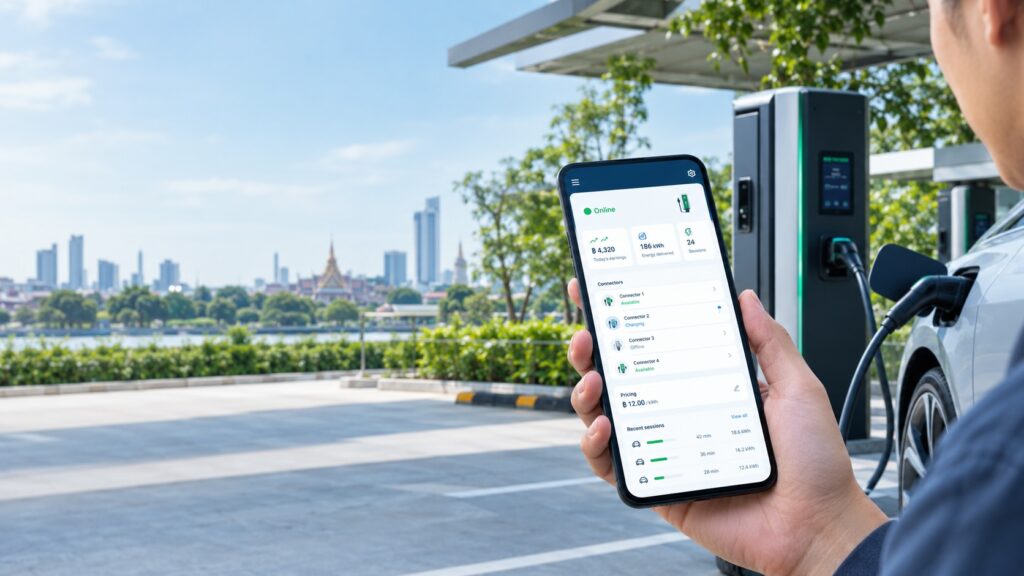
If you run EV chargers in Thailand, you have probably met this customer. A condominium juristic person, a hotel, a restaurant or a resort agrees to put chargers on its site. You install and operate them. A few weeks later the questions start, usually on LINE: "How much did we earn this week?" "Can we change the price?" "Can you switch off connector 2? It’s being repaired."
None of these is hard to answer. Together they become a standing support queue. The usual fix, giving the host a login to your full admin dashboard, shows them far more than they need.
What a site host actually wants
Three things:
- To see the money and the status. Earnings today and to date, and whether each connector is available, charging or faulted.
- To set the price. A rate per kWh they can adjust without waiting for you.
- To take a connector out of service for maintenance, and bring it back.
What they don’t need is the operator’s view: every user and RFID tag, wallet transactions, the audit log, roaming partners. Handing that over is both noise for them and exposure for you.
How the Owner App handles it
The Simplico Charging Platform includes an Owner App built for this person. What it does today:
- Logs in with the charger’s own credential. The host uses the same OCPP Basic Auth password already on the charger. There is no separate account to create, forget or reset.
- Shows revenue and status. Today’s and all-time earnings, live connector state and recent sessions.
- Lets the host set the rate per kWh, or hide a connector for maintenance.
- Resets the password in one tap. It generates an OCPP-compliant key and pushes it to the charger live.
It sits next to the operator dashboard, the driver’s scan-to-charge page and OCPI roaming in the same platform. The driver side is covered in The EV Driver App You Don’t Have to Build.
The other half: what the driver does at the same charger
A host’s dashboard only matters if charging is easy for drivers. On this platform a driver needs no app install and no account. They scan a QR code posted at the charger, set a budget and charge. From scan to receipt takes six steps:
flowchart TD
    A["1 Scan the QR code at the charger"] --> B["2 Select a connector if there are several"]
    B --> C["3 Set an amount of 50 baht or 100 baht or custom"]
    C --> D["4 Start charging"]
    D --> E["5 Live session shows energy and cost and duration"]
    E --> F["6 Stop and get a receipt"]
    classDef cp fill:#d1fae5,stroke:#047857,stroke-width:2px
class D cp- Scan the QR code posted at the charger.
- Select the connector, if there are several.
- Set an amount: ฿50, ฿100 or a custom figure.
- Start charging. This is the one step where the app talks to the charger: the platform sends a RemoteStart over OCPP.
- Watch the live session: energy, cost and duration.
- Stop and get the receipt.
For a host, this means nobody is asked to download anything. The driver side is a mobile web page, and the QR code at the bay is the whole onboarding. The idea is covered in more depth in The EV Driver App You Don’t Have to Build.
What the operator sets up, once per charger
- Connect the charge point to the platform.
- Get its password. This is the OCPP Basic Auth credential, the same one the host’s Owner App logs in with.
- Verify. The charge point ID appears in the Setup Guide’s live list within seconds.
- Generate the driver link and QR code, optionally for a single connector.
- Post the QR code at the charger. This is where the host comes in. Agree at handover who does it.
Will drivers find the station?
Once a charger is installed, the next question from a host or operator is usually: how will drivers know it’s there? There are two layers.
Inside the platform. The driver page searches for nearby chargers by location, across your own network and roaming partners. When the home network has nothing close by, partner-network stations appear automatically.
In trip planning. Drivers on a long trip plan before they leave. simpliRange is our free EV road-trip planner for Thailand, in Thai, English, Japanese and Chinese. The driver picks a car, sets A and B on a map, and gets charging stops planned against a safety margin, with weather along the route. Its charger locations come from Open Charge Map, a community-maintained database, so a station can be missing or out of date. It doesn’t show live availability yet, because that depends on operators choosing to share it. The simpliRange launch post explains the data sources and limits.
What to do: look for your site in simpliRange. If it’s missing or wrong, we’d like to hear about it. If you would consider sharing live availability, write to hello@simplico.net with the subject "simpliRange operator".
The trade-off to weigh
Using the charger’s credential as the login has a clear upside: nothing new for the host to manage, and access follows the physical asset. It also means the credential does double duty. Whoever holds the charger’s password can open the app for that charger.
That is why the one-tap reset matters. When a host’s manager leaves, or the password has travelled further than intended, you can rotate it and push the new key to the charger without a site visit.
Decide four things before handover
- Who keeps the credential. The host, or you?
- What the host sees. Check what session information the host’s view includes and whether that fits your approach to Thailand’s PDPA.
- Who changes prices. The app gives the host the control. Whether it is the host’s call or yours is a commercial agreement, so settle the rule first.
- How you share revenue, if you do. This post covers visibility and controls, not settlement arrangements.
Where it fits
Condominiums and resorts are the sites our EV CSMS page points its Starter package at, alongside small operators getting started. Hotels, restaurants and car parks follow the same pattern: the business hosting the charger wants the numbers and a few controls, not a network to run.
What it is not
- Not the operator dashboard. Fleet management, users and RFID tags, payment history and the audit log stay on the operator side.
- Not a revenue-sharing tool. It shows what a charger earned. It doesn’t decide who is paid what.
See it, then tell us about your site
The Charging Platform page shows live captures of the Owner App from a running instance, not mockups, and a public setup guide walks a charge point from unboxing to its first authenticated connection.
If you host chargers for other people, or are about to, send us your site type, number of chargers and how many hosts you deal with at hello@simplico.net with the subject "Host dashboard pilot". We’ll reply with a scoped proposal within 48 hours. You can also reach us on LINE at iiitum1984.
FAQ
Does the host need to create an account?
No separate account. The host logs in with the OCPP Basic Auth password already set on the charger.
Can the host change the price?
Yes. The Owner App lets the host set the rate per kWh and see per-connector pricing.
Can the host take a connector out of service?
Yes. A connector can be hidden for maintenance.
What if the password has been shared more widely than intended?
Use the one-tap password reset. It generates an OCPP-compliant key and pushes it to the charger live.
Is it a replacement for the operator dashboard?
No. It is a smaller view for the person who hosts the charger. Fleet management, users, payments and the audit log are on the operator dashboard.
Do drivers need an app or an account?
No. A driver scans the QR code posted at the charger, sets an amount and charges. It opens as a mobile web page.
Can a driver set a spending limit?
Yes. The driver picks ฿50, ฿100 or a custom amount before starting, watches energy and cost live, and can stop at any time to get a receipt.
Will drivers be able to find my station?
In the platform’s driver page, drivers can search nearby chargers across your network and roaming partners. For trip planning, simpliRange shows charger locations from Open Charge Map and doesn’t show live availability yet. If you would share live status, write to us with the subject "simpliRange operator".
Which chargers work with the platform?
Any charger that supports OCPP 1.6J over WebSocket. The EV CSMS page lists brands we have run sessions against.
Who is behind this?
Simplico, a software engineering studio based in Thailand. We build and operate charging platforms for EV charging operators across Thailand and Southeast Asia.
Related Posts
- The EV Driver App You Don’t Have to Build: QR-Code Charging with OCPP ID Tags
- OCPI Explained: What CPOs and eMSPs Actually Need to Build for EV Roaming
- From Zero to OCPP: Launching a White-Label EV Charging Platform
- simpliRange Is Live in Early Form: Try the EV Road-Trip Planner Built for Thai Roads and Tell Us Where It’s Wrong
Latest Posts
- Why AI Agents Stall in Southeast Asian Enterprises, and the Trust Layer That Gets Them Live October 15, 2026
- Which Product Should a Creator Promote? An Idea We Want to Test October 14, 2026
- A Local LLM in a Factory, With Nothing Leaving the Building October 13, 2026
- Japan’s Active Cyber Defense Law Is Live: What Suppliers to Critical-Infrastructure Operators Should Have Ready in the First 30 Days October 13, 2026
- Find a Subaru Service Shop in Thailand: A Small Tool That Shows Where Each Detail Came From October 12, 2026
- Car Tax, พ.ร.บ., ID Card, Passport: An Idea for One App That Remembers Every Renewal, and Why We Want Your Feedback First October 5, 2026